



Unicode text and Unicode files in UltraEdit
XML Manager: In-line editing of XML files
The XML Manager allows you to navigate through complex XML data. But, what happens when you want to make a quick edit to your XML tags/data…. UltraEdit v16.00 extends the XML Manager with inline editing, giving you a faster and more elegant method of editing XML files.
XML Manager: In-line editing of XML files
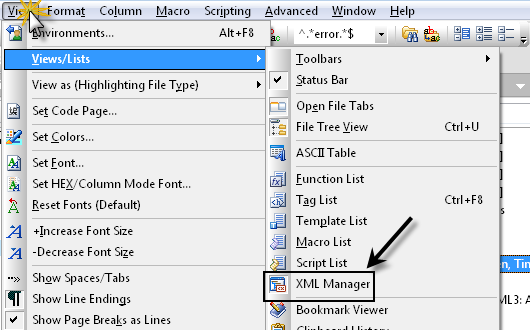
Of course, to use the in-line editing feature in the XML Manager, you need to have the XML Manager open. You can access the XML Manager in the View : Views/Lists : XML Manager.
Of course, to use the in-line editing feature in the XML Manager, you need to have the XML Manager open. You can access the XML Manager in the View : Views/Lists : XML Manager.
Open an XML file, and you will see that the tags/data are displayed in the XML Manager window.
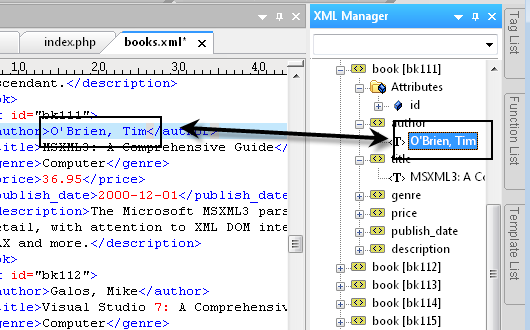
To use the in-line editing, simply click to highlight a tag/data, then click on it again. The highlighted area will turn into an entry field:
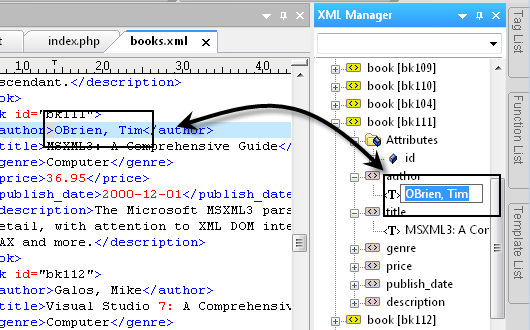
Type your desired text, then hit enter. You will see that the data in your file has been updated accordingly.